
By Anthony Ménard, updated on November 23, 2026
WooCommerce digital product passport: integrate it in 5 steps
Integrating a digital product passport into WooCommerce involves adding the data required by the European ESPR regulation to each product listing, publishing it on a public passport page, and linking it to the physical product via a QR code in GS1 Digital Link format. Since July 20, 2026, the European Commission has opened the European Product Passport Register, with the first requirement applying to batteries on February 18, 2027. For textiles, tires, and furniture, the deadlines are being rolled out category by category, but the catalog preparation should begin now.
In summary: Three official guidelines frame the integration of a digital product passport into a WooCommerce store.
European Commission, 2026
Regulation (EU) 2023/1542
ESPR, art. 4 (2024)
Regulation ESPR (EU) 2024/1781 has been in force since 18 July 2024, but it does not make the passport mandatory for any product on its own: each family receives its own deadline by delegated act.
📋 Summary
- What does a digital passport produce and who is affected?
- What data should a digital passport contain?
- Method: Integrating the digital product passport into WooCommerce in 5 steps
- Existing extension or custom development: which to choose?
- What changed in 2026 and what will happen in 2027
- What mistakes should you avoid in a WooCommerce store?
- FAQ — Digital Product Passport and WooCommerce
What does a digital passport produce and who is affected?
A digital passport product (DPP, for Digital Product PassportA product datasheet (PDS) is a digital information sheet attached to a physical product, accessible via a data carrier such as a QR code, which gathers information on its composition, origin, repairability, and end-of-life. It was created by Regulation (EU) 2024/1781 on the ecodesign of sustainable products, known as the Ecodesign Directive. ESPR, in force since 18 July 2024 according to EUR-Lex. The regulation sets the framework; delegated acts, adopted product family by product family, determine the exact list of data and the application date.
This applies to companies that place a product on the European market whose category is covered by an applicable delegated act, regardless of their size. The 2025-2030 work plan adopted by the European Commission on April 16, 2025, designates six priority categories: iron and steel, aluminum, textiles (with an emphasis on clothing), furniture, tires, and mattresses. A WooCommerce store selling clothing, furniture, or tires online is therefore directly within the scope, even if the exact date of its obligation has not yet been set.
What data should a digital passport contain?
The passport contains at least a unique product identifier, an economic operator identifier, the data required by the delegated act of its family and a data carrier conforming to the ISO/IEC 15459 standard. Article 10 of the ESPR specifies that the data carrier and the unique identifier must comply with this ISO/IEC 15459:2015 standard, that the information is based on open and interoperable standards, and that the passport data is organized into three levels of access: public, legitimate interest and market surveillance authorities.
| Passport data | Who provides it? | Where she lives in WooCommerce |
|---|---|---|
| 🔢 Unique product identifier (GTIN, batch or serial number) | You, via GS1 France, for a GTIN | WooCommerce native GTIN field or product metadata |
| 🏭 Economic operator and factory identifier | You or your manufacturer | Global shop settings, repeated on each passport |
| 🧵 Composition, materials, substances of concern | Suppliers, design office | Product metadata, imported via CSV or API |
| 🔧 Repairability, spare parts, end of life | Manufacturer, after-sales service | «Passport» tab of the product sheet |
| 📱 Data carrier (QR code) and passport URL | Iotaweb, automatically generated | SVG image by reference, public page /passport/ |
| 🇪🇺 Registration in the European register | You, via web interface or API | Registration ID stored on the product |
The precise list of information depends on Annex III of the ESPR and the delegated act for each family. This is not legal advice: before finalizing your data template, check the text applicable to your products with the European Commission or your professional federation. If your data sheets are still incomplete, the’Importing catalogs with EAN codes and enriching them with AI that we created for a distributor shows how to structure a catalogue before adding a passport to it.
🛂 Is your WooCommerce store ready for the digital product passport?
Anthony Menard, Iotaweb — Guingamp, Côtes-d'Armor (22) · Technical integration of the passport, public page and QR code · Free quote within 24 hours
Method: Integrating the digital product passport into WooCommerce in 5 steps
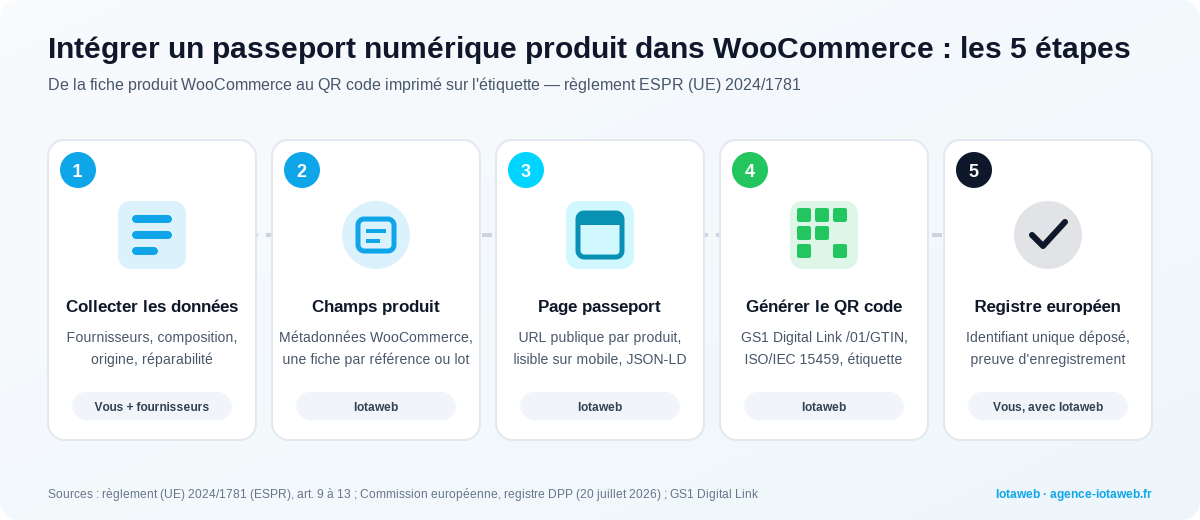
The integration process involves five steps: collecting data from suppliers, creating fields on the product sheet, publishing a passport page for each product, generating the QR code in GS1 Digital Link format, and then registering the passport with the European registry. The most time-consuming part isn't technical: it's collecting reliable data from suppliers, which must begin well before the mandatory date.
🛠️ The 5 steps of integration
- Collect the data. A spreadsheet for each supplier with the columns from Annex III: materials, origin, substances, repairability, end of life. Holes are identified at this stage, product by product.
- Create the fields on the product sheet. A «Passport» tab in the WooCommerce product data, with one field per required data point, at the model, batch, or item level depending on the chosen granularity. Variations inherit the fields from the parent product.
- Publish the passport page. A public and stable URL per product, readable on mobile after scanning, with data structured in JSON-LD for search engines and AI assistants. Private data remains behind authentication.
- Generate the QR code. One QR code per reference, which encodes the passport address in GS1 Digital Link format, with the GTIN identifier conforming to ISO/IEC 15459; it is exported in SVG for the label, packaging or leaflet.
- Register in the European register. The registry, opened on July 20, 2026, accepts registration via web interface or API, and issues proof of electronic registration according to the European Commission (2026); the identifier obtained is stored on the product.
A QR code GS1 Digital Link refers to a QR code whose web address encodes the product identifier according to a standardized structure, for example https://votre-boutique.fr/01/03401234567890 for a GTIN, followed by /10/ for a batch or /21/ for a serial number. GS1 indicates that ISO/IEC 15459 identifiers beginning with a digit are issued by GS1, making the GTIN directly usable as a unique passport identifier (GS1 in Europe, 2024). A single code on the packaging then serves for checkout, passport, and recycling.
Existing extension or custom development: which to choose?
A WordPress plugin is sufficient for a small catalog with simple data; a custom solution becomes necessary as soon as the data comes from multiple suppliers, the store sells in several countries, or a specialized DPP platform is already in place. Several free plugins exist on the WordPress.org directory: they add a passport tab to the product page, generate a QR code locally, and expose a REST API, but their descriptions themselves specify that the official data format is not finalized for all categories.
- fewer than a few hundred references, without complex variations
- the data fits into about ten manually entered fields
- one language, one country of sale
- No management software or DPP platform to synchronize
- The data arrives from multiple providers, in CSV format or via API.
- The passport must follow the batch or serial numbers.
- The store is multilingual (TranslatePress, WPML) and supports multiple currencies.
- A DPP platform or an ERP already exists and should remain the source
In both cases, Iotaweb's role is technical integration into the store: we do not calculate carbon footprints or issue certificates of conformity, which are the responsibility of a consulting firm or a specialized platform. Our WooCommerce development assisted by Claude allows you to deliver a passport tab, a public page and a QR code generator tailored to your catalogue, without depending on an external subscription.
What changed in 2026 and what will happen in 2027
The year 2026 brought the passport to fruition: the European register went online, its operating rules were in effect, and six harmonized standards were published. On July 20, 2026, the European Commission launched the register of digital passports produced with a test environment; Implementing Regulation (EU) 2026/1778 of July 16, 2026, which sets out its modalities, has been applicable since August 6, 2026, according to EUR-Lex. Six standards, EN 18216 to 18223:2026, on identifiers, data carriers, APIs, and storage, were cited in the Official Journal by Implementing Decision (EU) 2026/1736.
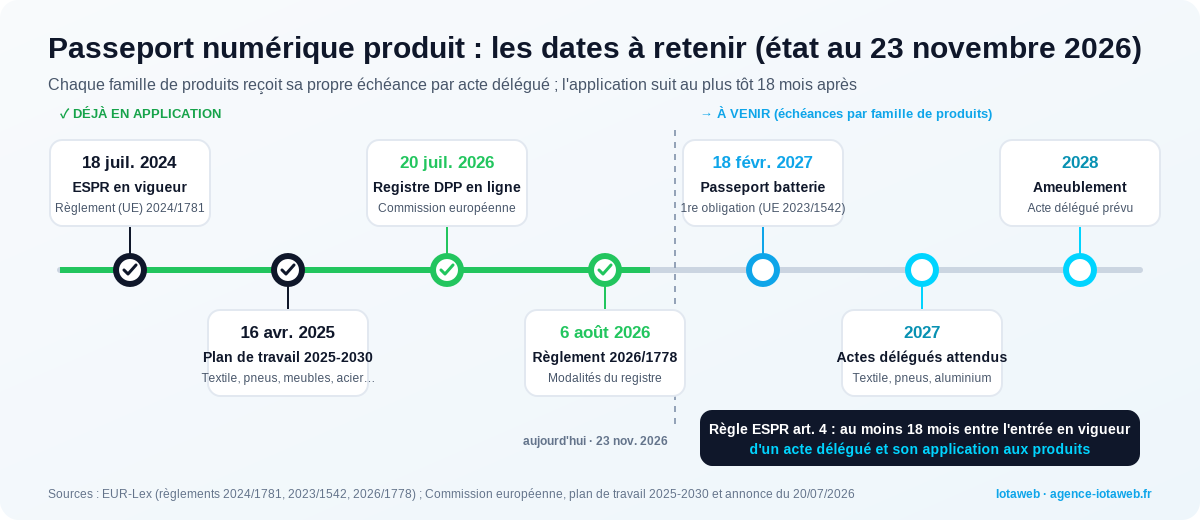
For 2027, the European Commission announced the first obligation on February 18, 2027, for certain batteries, under Regulation (EU) 2023/1542, and plans to adopt delegated acts for textiles, tires, and aluminum in 2027, then furniture in 2028, and mattresses in 2029, according to its 2025-2030 work plan. Article 4 of the ESPR requires a minimum of 18 months between the entry into force of a delegated act and its application: a textile act adopted at the end of 2027 would therefore not apply before 2029. This timeframe is the time you have to ensure the reliability of your data, not a reason to wait.
📋 Checklist before launching the project
- Is your product family included in the 2025-2030 work plan (textiles, furniture, tires, mattresses, steel, aluminum)?
- Do your products already have a GTIN, or do you need to request one from GS1 France?
- At what level do you track your products: model, batch or item?
- Can your suppliers provide composition and origin information in file format?
- Is your shop multilingual? The passport will need to be in each language.
What mistakes should you avoid in a WooCommerce store?
The most costly errors are manually entering data without a source, using a QR code to link to a page that will change address, publishing restricted data for public access, and waiting for the delegated act to begin data collection. A passport page is designed to last the entire lifespan of the product: the ESPR stipulates that the passport remains available even after the operator ceases operations, hence the backup copy with a third-party provider mentioned by the Commission (DG ENV, 2024).
And on Shopify or a custom-built website?
The principle is the same: fields per product, a public passport page, and a QR code. On Shopify, custom catalog fields (metafields) replace WooCommerce metadata, and the passport page is built within the theme or via an app. For a brand that also sells on marketplaces, the ESPR requires that a copy of the data carrier or unique identifier be made available to distributors and online marketplaces. If you're still hesitating between platforms before launching your store, our comparison... WordPress, Shopify or Webflow for a Breton SME details the criteria.
FAQ — Digital Product Passport and WooCommerce
No, not yet for most products. Regulation ESPR (EU) 2024/1781 has been in force since July 18, 2024, but the passport only becomes mandatory with the delegated act for each product category. The first requirement concerns certain batteries on February 18, 2027, according to the European Commission. Textiles, tires, and furniture will follow after their delegated acts, with at least an 18-month implementation period.
By adding a passport fields tab to the product page, and then publishing a public page for each product linked to a QR code, the required data (unique identifier, composition, origin, repairability) is stored in WooCommerce metadata, displayed on a stable URL, and exposed in JSON-LD. A WordPress.org extension is sufficient for a small catalog; for larger catalogs, custom development connects the store to supplier files and the European registry.
A QR code in GS1 Digital Link format encodes a URL containing the product identifier, for example /01/ followed by the GTIN, then /10/ for a batch or /21/ for a serial number. Article 10 of the ESPR requires that the data carrier and the unique identifier comply with the ISO/IEC 15459:2015 standard, to which GS1 identifiers conform. A single code on the packaging then serves as the checkout code, passport, and recycling identifier.
Yes, for products covered by a legal requirement. The European Commission launched the register of digital passports produced on July 20, 2026: passport data remains stored with the operator, but each passport must be registered there with its unique identifier, via a web interface or API. Implementing Regulation (EU) 2026/1778, applicable since August 6, 2026, sets out the procedures and provides for proof of electronic registration.
In conclusion, integrating a digital product passport into WooCommerce is a data project before it's a technical one: fields per product, a stable public page, a GS1 Digital Link QR code, and registration with the European register. The register has been open since July 2026, the first obligation for batteries falls in February 2027, and the textile, tire, and furniture categories have 18 months to prepare their catalogs.
🛂 A digital passport integrated into your store, not just another subscription
Anthony Menard — Iotaweb, Guingamp (22) · WooCommerce and Shopify · since 2012 · detailed quote without obligation
📚 Also read
Sources: EUR-Lex — Regulation (EU) 2024/1781 of 13 June 2024 on the ecodesign of sustainable products (ESPR), Articles 4, 9 to 13 and Annex III · European Commission — «The Digital Product Passport Registry is now live» (July 20, 2026) · EUR-Lex — Implementing Regulation (EU) 2026/1778 of 16 July 2026 on the register of digital passports · European Commission — Ecodesign and Energy Labelling Work Plan 2025-2030 (16 April 2025) · Eurofins — Implementing Decision (EU) 2026/1736 and standards EN 18216 to 18223:2026 · GS1 in Europe — GS1 Standards Enabling DPP (ISO/IEC 15459 identifiers, GS1 Digital Link) · European Commission, DG ENV — The digital product passport in the ecodesign regulation (16 May 2024) · WordPress.org — Digital Product Passport extensions for WooCommerce (accessed 23/11/2026). This article describes a technical integration and is not legal advice.
See also
 WordPress site hacked: what to do in the first 24 hours?Hacked WordPress site: the procedure for the first 24 hours, step by step — isolate, clean, lock, report (CNIL, Google). Free quote from Iotaweb.
 Connecting WordPress to Claude via MCP: uses, limitations, securityConnecting WordPress or WooCommerce to Claude via an MCP connector: what it allows, the 3 paths in 2026, limitations and security. Iotaweb's 5-step method.
 MCP Server: What is it? Definition and examples for an SMEAn MCP server connects your website, online store, or CRM to Claude and ChatGPT. Simple definition, concrete examples for SMEs, and a secure method.
Entrust me with your project
Describe it in a few lines. You will receive a response and a free quote within 24 hours.