
By Anthony Ménard, updated on November 20, 2026
Connecting WordPress to Claude via MCP: uses, limitations, security
Connecting WordPress to Claude with an MCP connector allows querying and modifying the site using natural language: articles, pages, SEO settings, and WooCommerce orders. Since WordPress 6.9 and its Abilities API, an official or custom MCP server exposes these actions to Claude with the rights of a dedicated WordPress user, ideally initially in read-only mode.
In summary: three official benchmarks frame a WordPress connection ↔ Claude in 2026.
WordPress Developer Blog, February 2026
WordPress.org, version 0.7.0, October 2, 2026
Claude Help Center, 2026
Custom connectors (remote MCP servers) are available on all Claude offerings; on Team and Enterprise offerings, an account owner must first add the connector for the organization (Claude Help Center, 2026).
📋 Summary
- What exactly does a connection between WordPress and Claude allow?
- How does Claude communicate with WordPress via MCP?
- What are the three ways to connect WordPress to Claude in 2026?
- Method: Connecting Claude to WordPress in 5 steps, risk-free
- What are the limitations and mistakes to avoid?
- What's changing in 2026 for WordPress, WooCommerce and Claude
- FAQ — Connecting WordPress to Claude
What exactly does a connection between WordPress and Claude allow?
Once connected, Claude reads and modifies your site at your request, without copy-pasting: «list the articles without meta descriptions,» «prepare a draft on this topic,» «which WooCommerce orders have been pending for more than 48 hours?». MCP connector is a small program, called an MCP server, that exposes your site's data and actions to an AI assistant according to the Model Context Protocol, an open standard published by Anthropic at the end of 2024. Model Context Protocol (MCP) refers to this common language between assistants (Claude, ChatGPT, Cursor) and business tools: the assistant discovers a list of tools, then calls them during the conversation.
For a very small business or a small to medium-sized enterprise (SME), the tasks fall into three categories: content (writing, proofreading, and updating pages), management (orders, received forms, inventory), and maintenance (broken links, extensions to update, SEO tags). This is what Iotaweb does every day on its own websites, including this one.
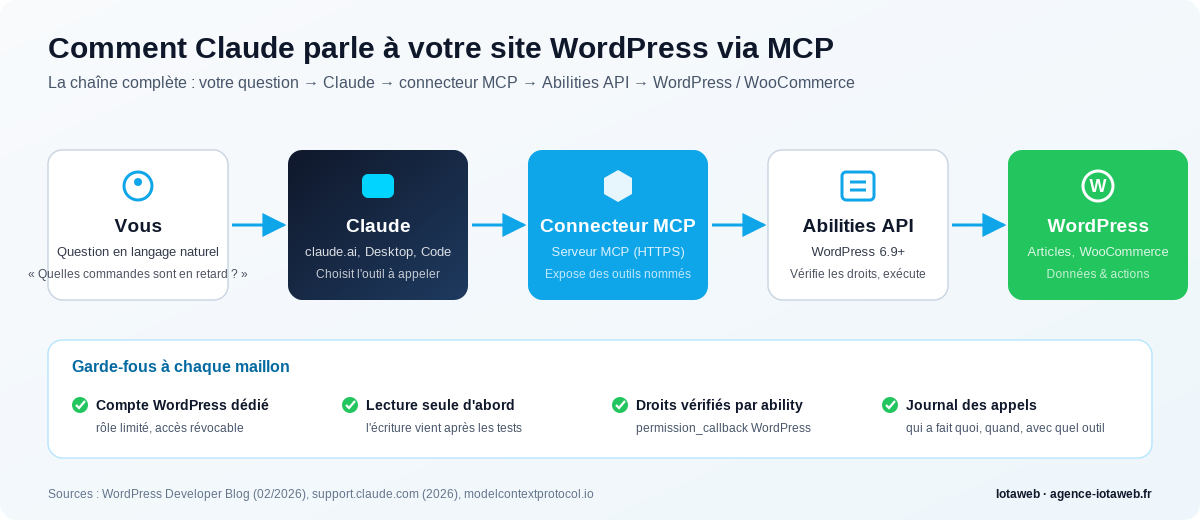
How does Claude communicate with WordPress via MCP?
Claude never directly accesses the database: he calls tools that WordPress has declared, and WordPress checks permissions before each execution.’API Capabilities is the WordPress 6.9 component that allows plugins to declare what they can do, with a name, an input and output scheme, and permission control (permission_callback), according to the WordPress Developer Blog (February 2026). WordPress 6.9 delivers three basic capabilities: site information, logged-in user, technical environment.
The official plugin MCP Adapter This translates these abilities into MCP tools: three generic tools for discovering, describing, and executing abilities, with support for the 2025-11-25 and 2026-07-28 protocol revisions (WordPress.org, version 0.7.0, October 2, 2026). A key point: «MCP clients act as logged-in WordPress users,» as the WordPress Developer Blog (2026) reminds us. Therefore, Claude's rights are those of the WordPress account used for the login.
| Element of the chain | Role | Who provides it? |
|---|---|---|
| 🧠 Claude (claude.ai, Desktop, Claude Code) | Understands the request, chooses the tool to call, presents the result | Anthropic |
| 🔌 MCP Connector (MCP Server) | Lists available tools, forwards calls, logs | MCP Adapter plugin, WooCommerce, or custom Iotaweb server |
| 🛡️ API Abilities | Check the permissions (permission_callback) then executes the action | WordPress 6.9 and site extensions |
| 🔑 Authentication | Application password for a dedicated account, or OAuth for a remote server | WordPress (limited rights account) |
| 🗂️ WordPress / WooCommerce | Articles, pages, media, SEO, products, orders | Your website |
🔌 Do you want to manage your WordPress or WooCommerce site from Claude?
Anthony Menard, Iotaweb — Guingamp, Côtes-d'Armor (22) · MCP connectors installed and maintained · Free quote within 24 hours
What are the three ways to connect WordPress to Claude in 2026?
There are three ways, from the simplest to the most complete: the official MCP Adapter plugin to test from Claude Desktop or Claude Code, the WooCommerce abilities to query your store, and a custom MCP connector in HTTPS to use it from claude.ai with your entire team.
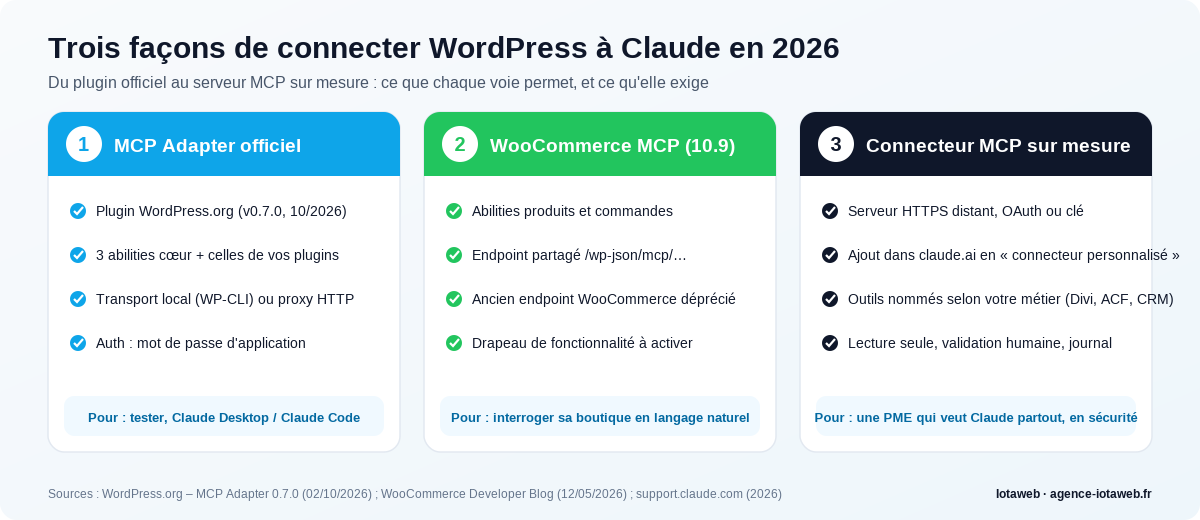
Option 1: the official MCP Adapter plugin, for testing from Claude Desktop or Claude Code
The MCP Adapter connects via STDIO using WP-CLI for a local site, or via HTTP using the proxy. @automattic/mcp-wordpress-remote with a WordPress application password (WordPress Developer Blog, February 2026). Only abilities marked as public for MCP are exposed. Limitation: for a self-hosted site, «there is currently no OAuth solution available,» so connections rely on application passwords or JWT tokens (Jonathan Bossenger, WordPress Developer Blog, February 2026).
Option 2: WooCommerce abilities, to communicate with your store
WooCommerce 10.9 introduces canonical abilities for products and orders, exposed via the shared endpoint. /wp-json/mcp/mcp-adapter-default-server ; the old endpoint /wp-json/woocommerce/mcp remains a deprecated transition method (WooCommerce Developer Blog, May 12, 2026). The integration is enabled by a feature flag in WooCommerce › Settings › Advanced.
Channel 3: a custom MCP connector, usable from claude.ai
A custom connector is a remote MCP server added to your Claude space; the connection then originates from Anthropic's infrastructure, not from your workstation (Claude Help Center, 2026). This is the approach Iotaweb recommends for SMEs: tools named according to your business («list pending quotes»), compatible with Divi, ACF, Gravity Forms, or your CRM, and a permissions policy written into the quote. Details are available on the page MCP connector for ChatGPT and Claude.
Method: Connecting Claude to WordPress in 5 steps, risk-free
The method consists of five steps: dedicated account, documented scope, read-only prototype, deployment in Claude, and monitoring with a log. It incorporates the recommendations of the WordPress Developer Blog (2026): dedicated users, read-only permissions on endpoints exposed to the internet, and logging.
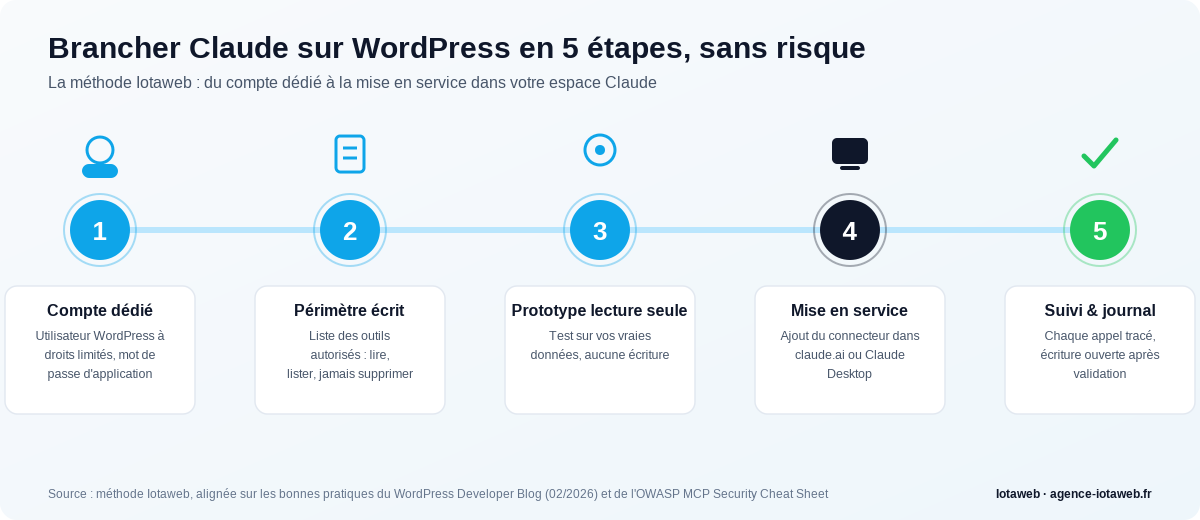
🛠️ The 5 steps to connecting
- Dedicated account. A WordPress user reserved for Claude, limited role, application password revocable with one click.
- Written perimeter. Read, list, create a draft. Never delete, never change settings, never publish without approval.
- Read-only prototype. Tested on your real data, without any writing.
- Commissioning. Adding the connector in claude.ai (Settings › Connectors › Custom Connector) or in Claude Desktop, demonstration tool by tool.
- Tracking and journaling. Each call is tracked; the writing opens action by action, after your agreement.
For a fixed scenario (a received form triggers an invoice), a no-code automation This is often sufficient; the MCP connector is used when you are the one asking various questions. For the basics, read first MCP Server: What is it?.
What are the limitations and mistakes to avoid?
The two main limitations are privileges and reliability: Claude acts with the privileges of the account he is given, and an AI can make mistakes. The OWASP Security Factsheet MCP (2026) cites «confused deputy» (a server that executes with its own privileges rather than those of the user) and prompt injection, where malicious content read by the assistant attempts to trigger an unintended action. Hence, five errors to avoid.
A compromised site remains a compromised site, connector or not: the Securing your WordPress site (updates, firewall, backups) always precedes opening to an AI assistant.
What's changing in 2026 for WordPress, WooCommerce and Claude
In 2026, the WordPress ↔ AI connection becomes standard rather than a workaround: the Abilities API has been in the WordPress core since version 6.9, the MCP Adapter is a canonical plugin on WordPress.org (version 0.6.0 from August 12, 2026, requires WordPress 6.9), and WooCommerce migrates its product and order abilities to the shared adapter. Regarding assistants, Claude's custom connectors are open to all plans, with only one connector on the free plan (Claude Help Center, 2026). The same MCP server also powers ChatGPT, and your company's visibility within these assistants becomes a key issue: Anthony Ménard discusses it on his page GEO expert and ChatGPT Ads.
The protocol is evolving rapidly (two versions of the plugin in four months): maintenance of the connector is part of the project, just like that of the site.
FAQ — Connecting WordPress to Claude
Yes, for testing. The MCP Adapter plugin is free on WordPress.org, and custom connectors are available on all Claude plans, with only one connector on the free plan (Claude Help Center, 2026). However, for use from claude.ai, an MCP server accessible via HTTPS is required, which necessitates suitable hosting and security configuration.
Yes, if the WordPress account used by the connector has publishing rights and if the corresponding tool is exposed. Iotaweb recommends limiting Claude to draft creation and reserving publishing for a human, at least initially. MCP clients act as logged-in WordPress users (WordPress Developer Blog, 2026): permissions are therefore configured at the account level.
Yes, provided you follow the basic rules: a dedicated account with limited rights, read-only permissions initially, a pre-production site for testing, and a call log. WooCommerce 10.9 exposes its product and order permissions via the shared MCP adapter, and each permission goes through WordPress's permission control (WooCommerce Developer Blog, May 2026). The risk comes from overly broad permissions, not from the protocol itself.
An automation always executes the same scenario, triggered by an event: a new form, a new order. An MCP connector makes your tools available to Claude, who then chooses what to consult based on your current question. The two complement each other: the assistant can trigger an existing scenario, and a scenario can prepare data that the assistant will then query.
In conclusion, connecting WordPress to Claude with an MCP connector is a standard integration in 2026: API capabilities, official MCP Adapter plugin, WooCommerce capabilities, and custom connectors are available on all Claude plans. What makes the difference is the method: dedicated account, written scope, read-only access, and call logs.
🚀 An MCP connector for your WordPress site, limited rights and log included
Anthony Menard — Iotaweb, Guingamp (22) · since 2012 · free and detailed quote within 24 hours
📚 Also read
Sources: WordPress Developer Blog — From Abilities to AI Agents: Introducing the WordPress MCP Adapter (February 4, 2026) · WordPress.org — MCP Adapter plugin, changelog 0.6.0 (08/12/2026) and 0.7.0 (10/02/2026) · WooCommerce Developer Blog — Introducing canonical WooCommerce capabilities for products and orders (May 12, 2026) · WooCommerce — WooCommerce MCP: Talk to your store like it's your AI assistant (2026) · Claude Help Center — About custom connectors (remote MCP servers), accessed on 20/11/2026 · Model Context Protocol — Security Best Practices (revision 2025-11-25) · OWASP — MCP (Model Context Protocol) Security Cheat Sheet (accessed 11/20/2026)
See also
 MCP Server: What is it? Definition and examples for an SMEAn MCP server connects your website, online store, or CRM to Claude and ChatGPT. Simple definition, concrete examples for SMEs, and a secure method.
 WordPress site hacked: what to do in the first 24 hours?Hacked WordPress site: the procedure for the first 24 hours, step by step — isolate, clean, lock, report (CNIL, Google). Free quote from Iotaweb.
 WooCommerce digital product passport: integrate it in 5 stepsIntegrating the digital product passport (DPP) into WooCommerce: data, passport page, GS1 QR code, European register open in 2026. Iotaweb method.
Entrust me with your project
Describe it in a few lines. You will receive a response and a free quote within 24 hours.