
By Anthony Ménard, updated on November 13, 2026
WordPress site hacked: what to do in the first 24 hours?
A hacked WordPress site should be dealt with in this order: isolate the site, copy evidence, diagnose, clean up, change all access permissions, and then report the incident. Acting quickly is crucial because, according to Patchstack (2026), approximately half of high-impact vulnerabilities are exploited within 24 hours of being published, but cleaning up before backing up evidence means losing track of the attack's origin.
In summary: Three official figures frame the response to a WordPress hack.
Patchstack, 2026
CNIL, art. 33 GDPR
Patchstack, 2026
Google states that reviewing a cleaned-up site «can take anywhere from a few days to a few weeks» (Google Search Console, 2026). This is not legal advice.
📋 Summary
- How to recognize a hacked WordPress site?
- Why are WordPress sites getting hacked in 2026?
- Method: The 6-step procedure for the first 24 hours
- What are the legal obligations after a website hack?
- What mistakes worsen a WordPress hack?
- How to avoid the next hack and who to call?
- FAQ — Hacked WordPress Site
How to recognize a hacked WordPress site?
A hacked WordPress site can be identified by visible symptoms (red warning page in Chrome, redirects to foreign sites, pages for medication or in Japanese in Google) or invisible ones (unknown files, an administrator user you didn't create, mass emailing). website hacking refers to unauthorized access to its files or database to place content, scripts, or redirects. Google defines the pirated content such as «any content placed on your website without your permission, due to security vulnerabilities on it» (Google Search Console, 2026).
Three reliable sources of alerts are: the «Security Issues» report from Google Search Console, the Wordfence scan (modified core files, unknown files in wp-content/uploads) and the hosting provider's access logs. A back door (backdoor) refers to a hidden PHP file that allows the hacker to return after a superficial cleanup: this is what explains the repeated reinfections.
Why are WordPress sites getting hacked in 2026?
WordPress sites are primarily hacked through their plugins: according to Patchstack (report «State of WordPress Security in 2026,» published February 25, 2026), 11,334 new vulnerabilities were identified in 2025, 42% more than in 2024. Of these, 91% were in plugins and 9% in themes, compared to only 6 in the WordPress core. The same report indicates that 46% of these vulnerabilities had no patch at the time of their public disclosure, and that the median time before the first exploitation of a high-impact vulnerability is 5 hours.
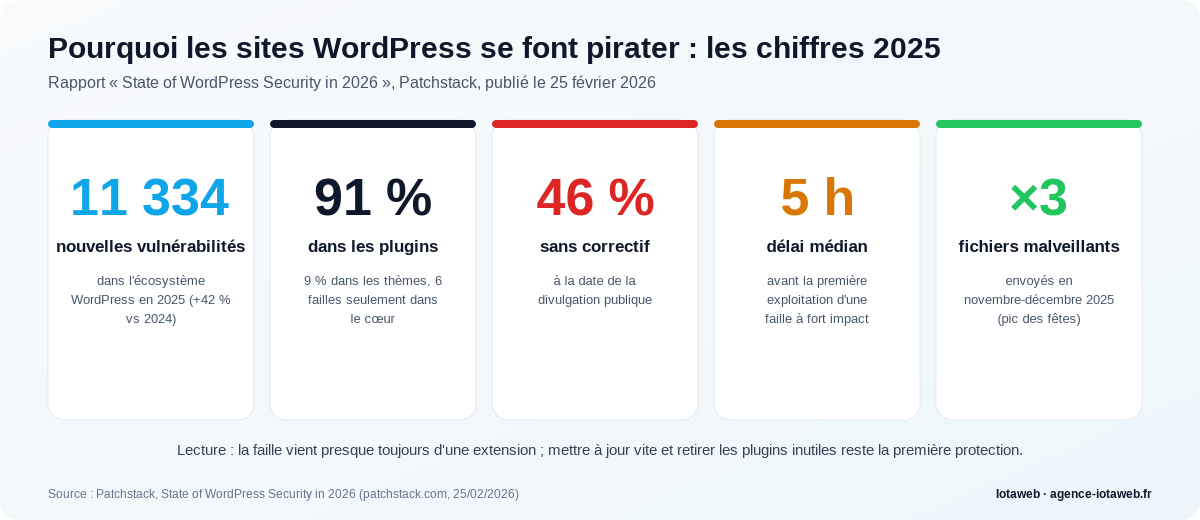
Patchstack also observes that malicious file transfers «almost tripled» in November and December 2025, a holiday period when websites are less monitored, and that generic hosting provider defenses blocked only 26% of attacks targeting WordPress vulnerabilities (Patchstack, 2026). An unpatched PHP vulnerability on the server adds another entry point: our article on the PHP vulnerability 2026 to check on your WordPress site explains how to control it.
🚨 Is your WordPress site now hacked?
Anthony Menard, Iotaweb — Guingamp, Côtes-d'Armor (22) · Manual malware removal, with or without backup · Since 2012
Method: The 6-step procedure for the first 24 hours
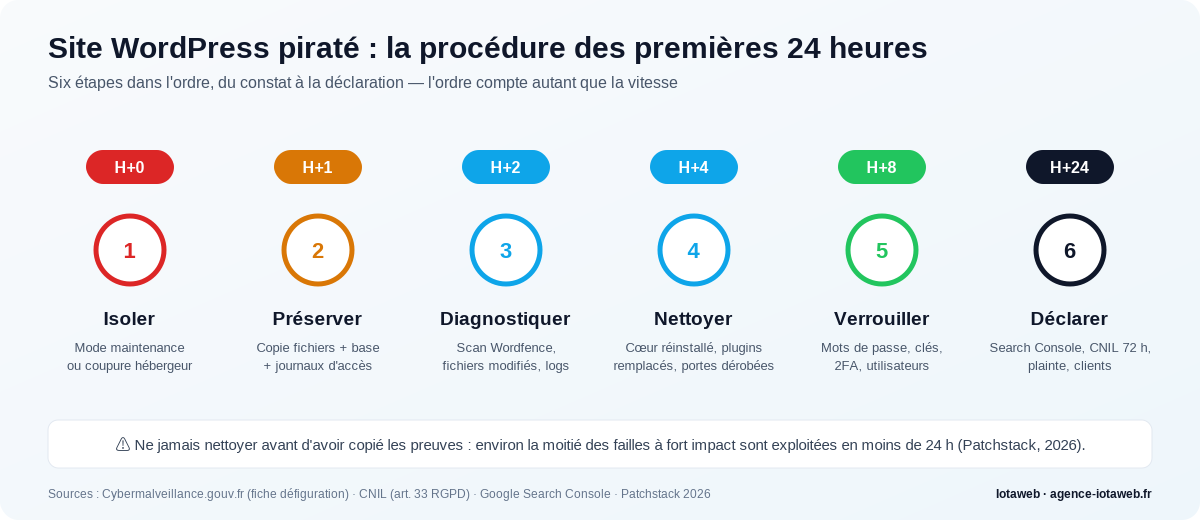
The procedure consists of six steps in a strict order: isolate, preserve evidence, diagnose, clean, lock, report. Cybermalveillance.gouv.fr recommends starting by disconnecting the machine from the internet or alerting the hosting provider, then retrieving logs and making a complete copy before any correction (quick reference guide «Website Defacement», 2026).
🛠️ The 6 steps, hour by hour
- H+0 — Isolate. Put the site into maintenance mode or ask the hosting provider to disable public access. Visitors should no longer be exposed to redirects or injected scripts.
- H+1 — Preserve. Copy all files, export the database, and download the access and error logs. This copy will be used to trace the origin of the attack and file a complaint.
- H+2 — Diagnose. Run a Wordfence scan, list files modified in the last 30 days, check administrator users, scheduled tasks (cron), and files
.htaccess. Compare the infection date to the logs to identify the input request. - H+4 — Clean. Reinstall the WordPress core from wordpress.org, replace each plugin and theme with an official copy, remove unused extensions, purge unknown files and backdoors, clean the database (options, injected articles, users).
- H+8 — Lock. Change all passwords (WordPress, FTP/SFTP, database, hosting), regenerate security keys in
wp-config.php, Enable two-factor authentication, limit login attempts. - H+24 — Declare. Request a review in Search Console if Google has flagged the site, notify the CNIL within 72 hours if personal data is involved, file a complaint, and inform customers if their data may have been exposed.
If no clean backup exists, the cleanup is done file by file: this is the intervention of manual malware removal and website security which we carry out at Iotaweb, with a working copy, cleaning, changing all accesses and then putting back online protected.
What are the legal obligations after a website hack?
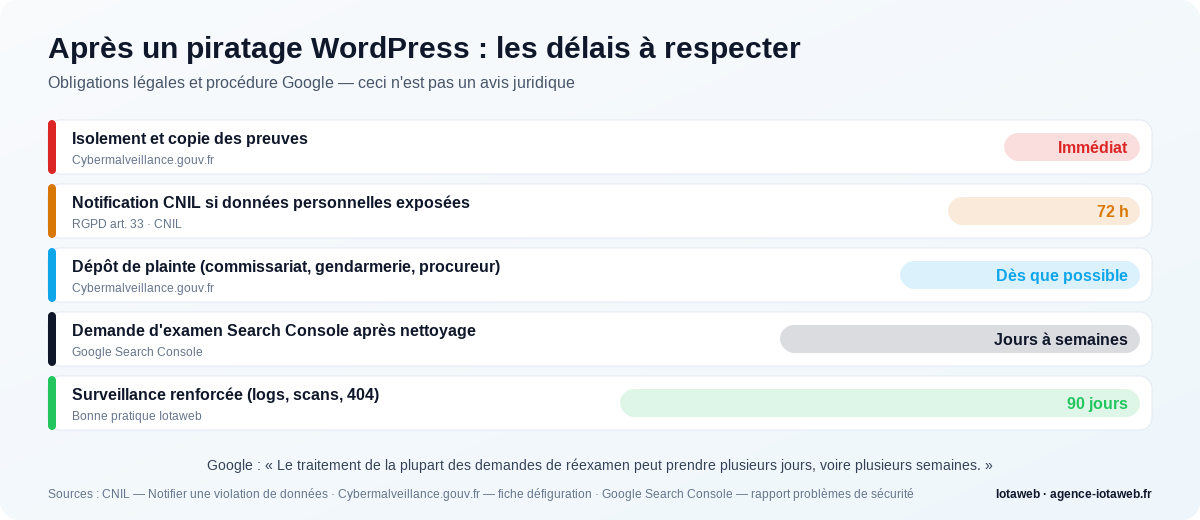
After a data breach, three steps are necessary depending on the situation: notify the CNIL (French Data Protection Authority) within 72 hours if personal data has been accessed or copied, file a complaint, and request a review from Google if the site has been flagged. This is not legal advice; if in doubt, the CNIL recommends notifying the CNIL anyway.
| Steps to take after a hack | Deadline | Who and how |
|---|---|---|
| 🏛️ Notification to the CNIL | 72 hours after verification (Art. 33 GDPR) | Online notification service on cnil.fr; informing the individuals concerned in the event of a high risk (art. 34); internally documented incident |
| 👮 Filing a complaint | As soon as possible | Police station, gendarmerie or letter to the public prosecutor, with newspapers and a copy of the website (Cybermalveillance.gouv.fr) |
| 🔎 Google Review Request | After a complete cleaning; response in «a few days to a few weeks» | Search Console › Security issues; one request at a time, describing the actions taken |
| 📧 Customer Information | Without delay if the risk is high | Clear message: nature of the incident, data involved, measures taken, advice (password change) |
Google warns that submitting a request while the problem persists slows down subsequent processing and that the site may be flagged as a repeat offender (Google Search Console, 2026). Once the site is clean, the rankings lost during the warning period can be recovered by resuming SEO work; Anthony Ménard also intervenes as freelance SEO consultant for this takeover audit.
What mistakes worsen a WordPress hack?
Five mistakes can turn a one-day incident into a permanent reinfection: cleaning without copying evidence, restoring an already infected backup, changing a single password, leaving extensions unused, and requesting a Google review too soon. In each case, the backdoor remains open or the Google alert persists.
Should I restore from a backup or clean it manually?
Restoring is only relevant if the backup predates the hacker's entry date, as recorded in the logs, and if the entry vulnerability is patched immediately afterward. Otherwise, manual cleanup is safer. WordPress recommends maintaining multiple dated snapshots of files and databases to enable restoration to a version prior to a compromise (WordPress.org, «Hardening WordPress» guide, 2026). Case of a carpentry company: renovation and security shows what happens when a site is rebuilt from scratch after being compromised.
How to avoid the next hack and who to call?
The next hack can be avoided with six settings recommended by WordPress.org and Cybermalveillance.gouv.fr: updates applied quickly, unused plugins removed, file permissions set to 755 for folders and 644 for files, file editing disabled (DISALLOW_FILE_EDIT), strong passwords with two-factor authentication, and tested backups stored off-site. What will change in 2026 is speed: with a median uptime of 5 hours (Patchstack, 2026), a monthly update will no longer be sufficient for exposed extensions.
✅ Post-cleaning security checklist
- ✓ Automatic updates enabled for the core and security extensions; weekly monitoring for the others.
- ✓ Application firewall (Wordfence), limiting connection attempts, blocking unnecessary countries or IPs as appropriate.
- ✓ PHP version maintained by the hosting provider,
wp-config.phpreadable only by the server. - ✓ Daily backups off-server, with a restore test every quarter.
- ✓ Newspapers regularly consulted to spot password tests (Cybermalveillance.gouv.fr).
- ✓ Enhanced monitoring for 90 days: scans, unusual 404 errors, new users.
Iotaweb, based in Guingamp, Côtes-d'Armor (22), intervenes on hacked WordPress sites in France and internationally: documented audit, manual cleanup even without backups, change of all access points, investigation of the attack's origin, then protection (Wordfence, CDN, fail2ban, two-factor authentication) and WordPress hosting maintained with off-site backups. The quote is free and the intervention begins with a working copy, never on the production site.
FAQ — Hacked WordPress Site
The most frequent signs are a red warning in Chrome or Google search results, redirects to unknown sites, indexed foreign language pages, an administrator account you didn't create, and modified files flagged by Wordfence. The «Security Issues» report in Google Search Console confirms a hack detected by Google (Google, 2026).
Isolate the site (maintenance mode or shutdown by the hosting provider), then copy the files, database, and access logs before any remediation. Cybermalveillance.gouv.fr recommends this order to preserve evidence and trace the source of the intrusion (see the website defacement fact sheet, 2026). Cleanup, access changes, and reporting should follow, within 24 hours.
Yes, if personal data (customers, forms, accounts) has been accessed, copied, or destroyed. The CNIL (French Data Protection Authority) requires initial notification within 72 hours of the discovery (Article 33 of the GDPR), and informs the individuals concerned in cases of high risk (Article 34). If in doubt, the CNIL advises notifying anyway. This is not legal advice.
Once all issues across the site have been fixed, you submit a review request from the Security Issues report in Search Console. Google states that this type of review «can take anywhere from a few days to a few weeks» and asks that you do not submit another request until you receive a response (Google Search Console, 2026). Submitting a premature request will slow down subsequent processing.
In conclusion, a hacked WordPress site can be recovered within 24 hours when the following steps are followed: isolate the site, preserve evidence, diagnose the problem, clean up the system, lock down all access points, and then report it to Google, the CNIL (French Data Protection Authority), and the relevant authorities. The real benefits come later: minimizing plugins to the essentials, performing frequent updates, using off-site backups, and monitoring the site to prevent a recurrence.
🛡️ Cleaning, securing, and relaunching your WordPress site
Anthony Menard — Iotaweb, Guingamp (22) · since 2012 · documented audit and free quote
📚 Also read
Sources: Patchstack — State of WordPress Security in 2026 (02/25/2026) · Cybermalveillance.gouv.fr — Quick reference guide «Website defacement» (accessed on 13/11/2026) · CNIL — Notifying a personal data breach (Art. 33 and 34 GDPR) · Google Search Console — Security Issues Report (accessed 11/13/2026) · WordPress.org — Hardening WordPress (permissions, DISALLOW_FILE_EDIT, backups) · Google web.dev — Clean up and maintain your website
See also
 Connecting WordPress to Claude via MCP: uses, limitations, securityConnecting WordPress or WooCommerce to Claude via an MCP connector: what it allows, the 3 paths in 2026, limitations and security. Iotaweb's 5-step method.
 MCP Server: What is it? Definition and examples for an SMEAn MCP server connects your website, online store, or CRM to Claude and ChatGPT. Simple definition, concrete examples for SMEs, and a secure method.
 WooCommerce digital product passport: integrate it in 5 stepsIntegrating the digital product passport (DPP) into WooCommerce: data, passport page, GS1 QR code, European register open in 2026. Iotaweb method.
Entrust me with your project
Describe it in a few lines. You will receive a response and a free quote within 24 hours.