
By Anthony Ménard, updated on November 17, 2026
MCP Server: What is it? Definition and examples for an SME
An MCP server is a small program that exposes the data and actions of a software application (WordPress website, WooCommerce store, CRM, database) to an AI assistant like Claude or ChatGPT, using an open standard called Model Context Protocol. For an SME, it's a way to ask its assistant questions about its actual orders, customers, or inventory, instead of copying and pasting data, with user-defined access rights.
In summary: Three public figures place the MCP standard in 2026.
MCP Project, December 2025
LocalCan, census of October 14, 2026
Agentic AI Foundation, Linux Foundation, 2025
The protocol was published by Anthropic in November 2024 and entrusted in December 2025 to the Agentic AI Foundation, a Linux Foundation fund supported by Anthropic, OpenAI, Google, Microsoft, AWS, Block, Cloudflare and Bloomberg.
📋 Summary
- What exactly is an MCP server?
- How does an MCP server work between the assistant and your tools?
- What are some concrete examples of MCP servers for an SME?
- What's changing in 2026: governance, ChatGPT and Claude
- When should you create your own MCP server, and when should you do without one?
- Method: Deploy an MCP server in 4 risk-free steps
- FAQ — MCP Server
What exactly is an MCP server?
An MCP server is the «software side» of a connection between an AI assistant and your tools: it advertises a list of tools («read orders», «search for a contact», «create a quote») that the assistant can call up during the conversation. Model Context Protocol (MCP) MCP refers to the open standard that describes how an assistant discovers and uses these tools; the official documentation compares it to a USB-C port for AI applications (modelcontextprotocol.io, 2026). The word «server» does not imply a dedicated machine: an MCP server can run on your web hosting, in the cloud, or on a simple workstation.
Before MCP, each AI vendor had to write its own integration for each software application. With MCP, a single connector serves all compatible assistants: the project cited native support in ChatGPT, Claude, Cursor, Gemini, Microsoft Copilot, and Visual Studio Code as of December 2025 (MCP project blog, 2025). If you encounter «MCP» in a telecom or cloud context prior to 2024, it refers to a different acronym.
How does an MCP server work between the assistant and your tools?
Three roles share the workload: the host (the assistant), the client (integrated into the assistant's application), and the server (your connector). The MCP host is the AI application you interact with; the MCP client discovers the server's tools and forwards the requests; the MCP server executes the action in your software and returns the result. Communication uses the JSON-RPC format, and the assistant chooses which tool to call based on your question, without requiring any programming from you.
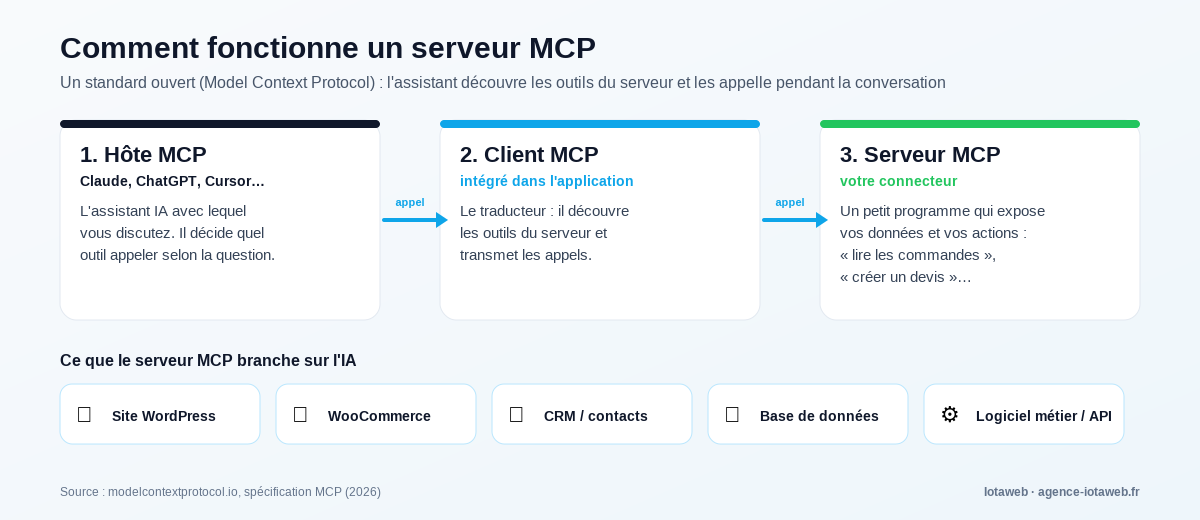
An MCP server comes in two forms. The local server runs on your computer, alongside the application (Claude Desktop, Cursor, VS Code). The remote server is hosted on a public HTTPS address: this is the dominant form today, as 64% of active servers in the official registry expose a remote URL, and 78% of servers published in October 2026 (LocalCan, 2026). Online assistants like Claude.ai or ChatGPT can only connect to a remote server: Anthropic specifies that Claude connects «from Anthropic's cloud infrastructure, not from your device,» on port 443 (Claude Help Center, 2026).
| Element of the MCP protocol | Role in the conversation | Example for an SME |
|---|---|---|
| 🤖 MCP Host | The AI application that receives your question and chooses the tool | Claude, ChatGPT, Cursor, Microsoft Copilot |
| 🔌 MCP Client | The layer that discovers the server's tools and forwards the calls | Integrated into the host, invisible to you |
| 🗄️ MCP Server | The program that exposes your data and your actions | WordPress, WooCommerce, CRM, and ERP connectors |
| 🛠️ Tool | A named action that the assistant can call | «List overdue orders», «Create a quote» |
| 📄 Resource | Content that can be viewed by the assistant | Product sheet, internal procedure, price |
| 🔐 OAuth 2.1 Authorization | The way the assistant identifies itself to the server | Login with your own rights, revocable |
🔌 Do you want to connect your website, your shop or your CRM to Claude or ChatGPT?
Anthony Menard, Iotaweb — Guingamp, Côtes-d'Armor (22) · MCP connectors in production at its own sites · free quote within 24 hours
What are some concrete examples of MCP servers for an SME?
The most profitable uses are those where the assistant reads your business data on demand: orders, inventory, contacts, website content, documents. Iotaweb manages its own WordPress sites daily (content, SEO, maintenance) using MCP connectors and installs what it uses itself for its clients. Here are five examples commonly found in very small businesses and SMEs in Brittany.
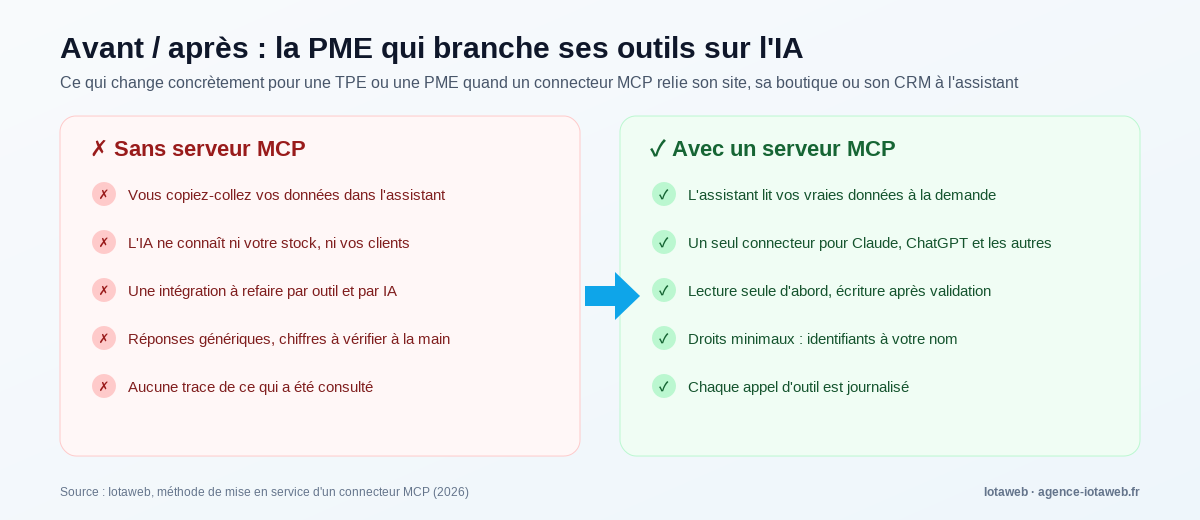
The MCP server differs from a Make or Zapier automation: the automation always executes the same scenario, while the MCP connector makes your tools available to the assistant, who then chooses what to consult based on the question. The two complement each other, and an assistant can trigger an existing scenario. To connect your tools without an assistant, see our service.’no-code automation.
What's changing in 2026: governance, ChatGPT and Claude
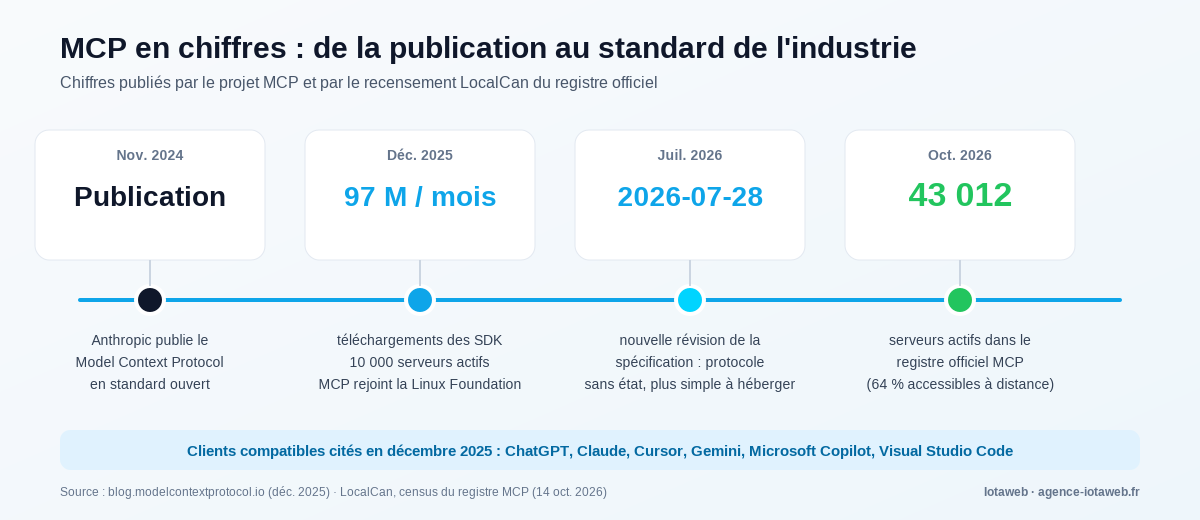
By 2026, MCP is no longer a publisher project but a shared infrastructure, governed by a neutral foundation and supported by the two consumer assistants. On December 9, 2025, Anthropic entrusted MCP to the Agentic AI Foundation, a Linux Foundation fund co-founded by Anthropic, Block, and OpenAI, with support from Google, Microsoft, AWS, Cloudflare, and Bloomberg (MCP project blog, 2025). At that time, the project reported 97 million monthly downloads of its SDKs and 10,000 active servers.
📆 Three key developments to watch out for in 2026
- The official register has taken off. It had 43,012 active servers on October 14, 2026, with 11,809 new servers for the month of September alone, compared to 274 in December 2025 (LocalCan, 2026).
- The specification 2026-07-28 makes the protocol stateless: each request carries its own version and capabilities, which simplifies hosting behind a load balancer (MCP changelog, 2026).
- ChatGPT and Claude accept your servers. At OpenAI, ChatGPT applications, full MCP support (write actions), and developer mode are reserved for the Business, Enterprise, and Edu plans, and only administrators can publish an application (OpenAI Help Center, 2026). At Anthropic, custom connectors are available on the Free (one connector only), Pro, Max, Ultra, Team, and Enterprise plans (Claude Help Center, 2026).
These access conditions vary depending on the service, and assistants require confirmation for certain writing actions: ChatGPT «may request confirmation depending on the application's permissions» (OpenAI, 2026), and Claude recommends clicking «Always allow» only for a trusted tool (Anthropic, 2026). This is why Iotaweb checks the compatibility of your subscription before any commitment.
When should you create your own MCP server, and when should you do without one?
Create a custom MCP server only if your software doesn't have an official connector and if you'll be asking the assistant repeated questions about your data. In most cases, simply plugging in existing connectors is sufficient: major tools (Google Workspace, Microsoft 365, HubSpot, Notion, Stripe, etc.) already publish theirs, and the official registry lists thousands. Customization becomes relevant in three situations.
The cost of a custom server depends on the number of tools to be exposed, the state of your API, and the desired level of security; connecting existing connectors is significantly less expensive. The three options (connecting, custom connector, maintenance) are detailed on the page Custom MCP connector for ChatGPT and Claude. To go beyond the connector and integrate a chatbot or AI function into your site, see the page AI integration.
Method: Deploy an MCP server in 4 risk-free steps
The safe method consists of four steps: framing the questions, prototyping in read-only mode, deploying with minimal privileges, and then monitoring and logging. Giving AI access to your tools requires these safeguards from the very first version, because Anthropic reminds us that a malicious server «can include hidden instructions» and that you should «only allow trusted servers» (Claude Help Center, 2026); the LocalCan survey also found that 52% of the remote servers surveyed responded without authentication (LocalCan, 2026).
🛠️ The 4 steps to commissioning
- Framing. You list two or three questions you would like to ask your assistant; from this we deduce the tools to be displayed, and those that will remain prohibited.
- Read-only prototype. The first server reads without modifying the data, tested on your real data. Writing only occurs after a test phase that you validate.
- Commissioning. Installation in your Claude or ChatGPT space with identifiers in your name, limited to the bare minimum; sensitive actions (sending, payment, deletion, publication) require your approval.
- Follow up. Log of each tool call, adjustments, and update when the protocol evolves, as with revision 2026-07-28.
An MCP server is a short development time when a clear API already exists: the server then simply translates this API into the protocol format. Official SDKs exist in TypeScript, Python, C#, Go, Rust, Ruby, Java, Kotlin, PHP, and Swift (MCP documentation, 2026), covering WordPress environments and most business applications. Projects already in production at Iotaweb, such as the Custom WooCommerce EAN import plugin with AI, They already connect catalogs and business APIs to AI; the MCP connector is the logical next step. For websites where visibility in ChatGPT or Perplexity is crucial, Anthony Ménard also offers support. GEO for SMEs.
FAQ — MCP Server
An MCP server is a small program that exposes the data and actions of a software (site, shop, CRM, database) to an AI assistant according to the Model Context Protocol, an open standard published by Anthropic in November 2024 and entrusted to the Linux Foundation in December 2025. The assistant discovers named tools there, for example «read commands», which it calls during the conversation.
An API is the technical interface of a software application, designed for developers. An MCP server translates this API into tools described in plain language, which the AI assistant discovers on its own and chooses to call depending on the question. It adds tool discovery, OAuth 2.1 authorization, and a common exchange format (JSON-RPC) to all compatible assistants, without requiring specific AI integration.
Yes. ChatGPT applications rely on MCP, and developer mode allows you to connect a custom MCP server to a workspace, including write actions. According to the OpenAI Help Center (2026), these features are available on the Business, Enterprise, and Edu plans, and only administrators can enable developer mode and publish an application. Iotaweb checks your plan before you begin.
It can be done, provided safeguards are in place: the initial version should be read-only, login credentials in your name should be limited to the bare minimum, sensitive actions should be validated by human intervention, and each connection should be logged. Anthropic recommends connecting only to trusted servers and reviewing the requested permissions (Claude Help Center, 2026). An internet-exposed server without authentication is the most common mistake to avoid.
In conclusion, an MCP server is the standard interface that connects your website, online store, or business software to Claude, ChatGPT, and other compatible assistants. By 2026, the protocol will be governed by the Linux Foundation, supported by the two major assistants, and boast over 43,000 public servers; for an SME, the challenge is no longer whether it works, but rather connecting it with the correct permissions, initially in read-only mode.
🚀 An MCP connector designed, installed and maintained for your business
Anthony Menard — Iotaweb, Guingamp (22) · since 2012 · read-only initially, minimal fees, free and detailed quote within 24 hours
📚 Also read
Sources: MCP Project Blog — MCP joins the Agentic AI Foundation (December 9, 2025: 97M monthly downloads, 10,000 active servers, compatible clients) · Model Context Protocol — Official documentation and comparison to the USB-C port (accessed 11/17/2026) · Model Context Protocol — Changelog for revision 2026-07-28 · LocalCan — State of MCP Server Development, official registry census (October 14, 2026: 43,012 active servers, 64% remote, 52% without identifier) · OpenAI Help Center — Developer mode and MCP apps in ChatGPT (Business, Enterprise, Edu offerings; accessed 11/17/2026) · Claude Help Center — Get started with custom connectors using remote MCP (offers, network requirements, security; accessed 11/17/2026) · Agentic AI Foundation — Platinum Members (Linux Foundation)
See also
 WordPress site hacked: what to do in the first 24 hours?Hacked WordPress site: the procedure for the first 24 hours, step by step — isolate, clean, lock, report (CNIL, Google). Free quote from Iotaweb.
 WooCommerce digital product passport: integrate it in 5 stepsIntegrating the digital product passport (DPP) into WooCommerce: data, passport page, GS1 QR code, European register open in 2026. Iotaweb method.
 Connecting WordPress to Claude via MCP: uses, limitations, securityConnecting WordPress or WooCommerce to Claude via an MCP connector: what it allows, the 3 paths in 2026, limitations and security. Iotaweb's 5-step method.
Entrust me with your project
Describe it in a few lines. You will receive a response and a free quote within 24 hours.