
By Anthony Ménard, updated on November 7, 2026
Slow WordPress site: what to do? Diagnosis in 10 minutes
A slow WordPress site can be diagnosed in ten minutes using PageSpeed Insights, the browser's Network tab, Query Monitor, and the Site Health tool. The cause is almost always one of six: undersized hosting, lack of caching, excessively large images, too many plugins, an unoptimized Divi theme, or blocking third-party scripts.
In summary: three official figures to find out if your WordPress site is really slow.
Google, web.dev, updated 2024
HTTP Archive, 2025
Google/SOASTA, 2017
For WordPress 7.1, the recommended PHP version is 8.4 or 8.5 (make.wordpress.org, 2026); PHP 8.2 will no longer receive security patches after December 31, 2026 (php.net).
📋 Summary
- At what point is a WordPress site considered «slow» by Google?
- Method: Diagnosing a slow WordPress site in 10 minutes
- What are the six most frequent causes and their remedies?
- How to speed up a Divi site without rebuilding it?
- What's changing in 2026: PHP, MySQL and Divi 5
- When should you entrust your optimization to Iotaweb?
- FAQ — Slow WordPress Site
At what point is a WordPress site considered «slow» by Google?
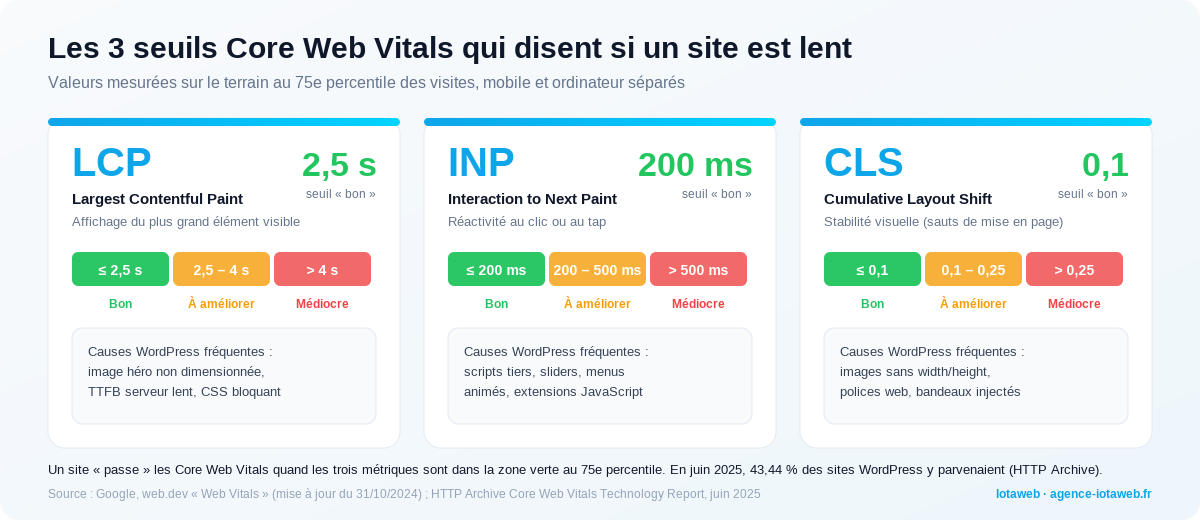
A site is considered slow as soon as it exceeds one of the three Core Web Vitals thresholds measured in the field: 2.5 seconds for LCP, 200 milliseconds for INP, and 0.1 for CLS, at 75e Percentile of visits (Google, web.dev, updated October 31, 2024). The Core Web Vitals These refer to the subset of Web Vitals that apply to all pages: LCP for displaying the largest element, INP for click responsiveness, and CLS for layout stability. slow WordPress site is therefore a site whose actual visitors are exposed to values above these thresholds.
This issue affects the majority of websites: according to HTTP Archive's Core Web Vitals Technology Report (June 2025), only 43.44% of WordPress sites received a good rating. The business implications are well-known: according to Google and SOASTA (2017), 53% of mobile visitors abandon a page that takes more than three seconds to load.
Method: Diagnosing a slow WordPress site in 10 minutes
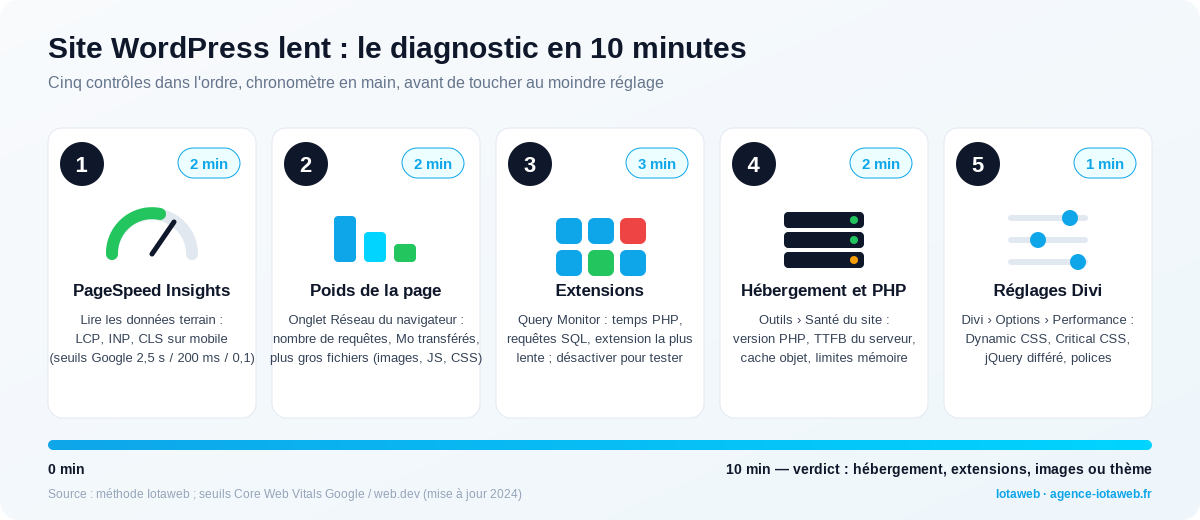
The diagnosis takes only five successive checks, ten minutes flat, and almost always identifies the culprit before any adjustments are made. The classic mistake is to install a caching extension first: this masks the symptom without addressing a saturated server or an excessively resource-intensive extension.
🛠️ The 5 steps of diagnosis
- PageSpeed Insights (2 min). Read the «Real user data» block on mobile: if LCP, INP and CLS are green, the site is not slow for Google.
- Page weight (2 min). Browser Network tab, cache disabled: number of requests, megabytes transferred, three largest files.
- Extensions (3 min). Query Monitor displays PHP time, SQL queries, and the most expensive extension; disable it on a copy of the site to confirm.
- Hosting and PHP (2 min). Tools › Site Health: PHP version, object cache, memory limit. A TTFB (Total Time To First) greater than 600 ms on a cached page indicates hosting issues.
- Divi settings (1 min). Divi › Theme Options › Performance: check that Dynamic CSS, Critical CSS and jQuery reporting are enabled.
🐢 Is your WordPress site slow and you don't know where to start?
Anthony Menard, Iotaweb — Guingamp, Côtes-d'Armor (22) · WordPress sites since 2012 · Performance score above 90 in less than 7 days
What are the six most frequent causes and their remedies?
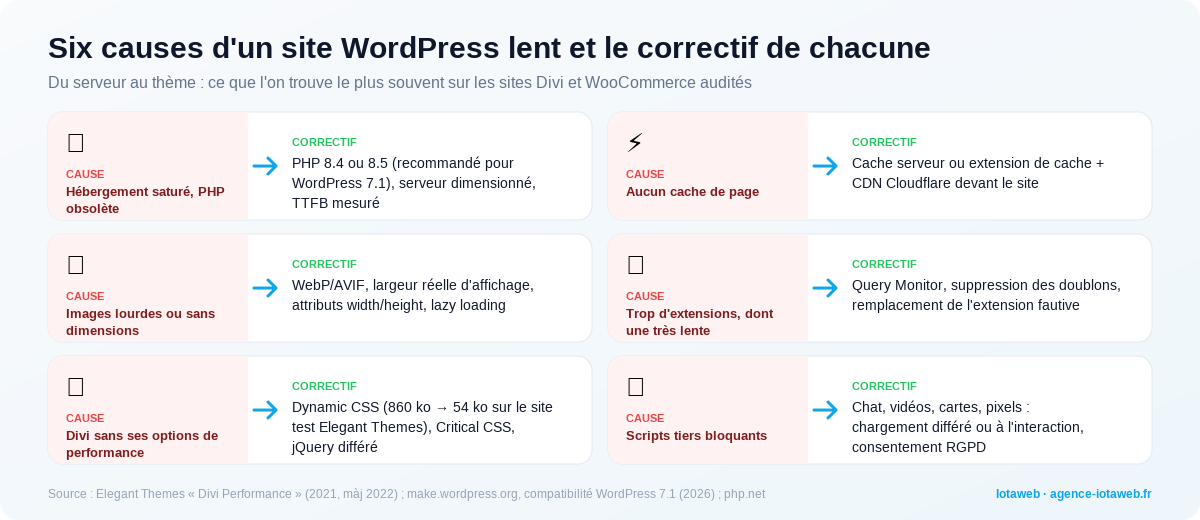
Six causes explain almost all the slow WordPress sites we audit: saturated hosting or outdated PHP, lack of page caching, large or incorrectly sized images, excessive plugins, disabled Divi performance options, and blocking third-party scripts. The order of fixes matters: server and cache first, then theme, and third-party scripts last.
| Cause of slowness | Symptom in diagnosis | Recommended fix |
|---|---|---|
| 💻 Hosting full, outdated PHP | High TTFB even in cache; PHP 8.1 or earlier in Site Health | Upgrade to PHP 8.4 or 8.5, recommended for WordPress 7.1 (make.wordpress.org, 2026); change your plan if the server remains slow. |
| ⚡ No page cache | Each visit executes PHP and the database | Server cache or cache extension, then Cloudflare CDN in front of the site |
| 📷 Large or dimensionless images | Files of several MB in the Network tab; High CLS | WebP or AVIF, actual display width, width and height attributes, lazy loading off-screen |
| 🧩 Too many extensions | Query Monitor points to an extension that dominates PHP time | Remove duplicates, replace the faulty extension, keep only what is useful |
| 🎨 Divi not optimized | Large CSS and JavaScript files, externally loaded fonts | Enable Dynamic CSS, Critical CSS, jQuery deferral, and Google Fonts caching |
| 📡 Blocking third-party scripts | Degraded INP; chat, videos, maps, or pixels loaded upon opening | Delayed or interaction-based loading, subject to GDPR consent |
If your hosting is the problem, our page WordPress hosting describes what we are putting in place, and the article Check and correct the PHP version of your WordPress site explains how to change versions without breaking the site.
How to speed up a Divi site without rebuilding it?
A Divi site can be sped up without a redesign by enabling the theme's performance options, which are often disabled on sites built before 2021. According to Elegant Themes (2021, updated 2022), the Dynamic CSS assembles the stylesheet page by page and reduced the CSS of its test site from 860 KB to 54 KB; the core JavaScript was halved, and the Critical CSS Prioritizes the style of the part visible on the screen. These settings are located in Divi › Theme Options › Performance.
Next, the jump from 60 to 90 on PageSpeed Insights comes down to the details: script order, LCP image preloading, local fonts. Our guide Improve your WordPress PageSpeed score in 5 steps details this second phase.
What's changing in 2026: PHP, MySQL and Divi 5
In 2026, three deadlines make ignoring a slow WordPress site more expensive: the end of security support for PHP 8.2 on December 31, 2026 (php.net), the end of life for MySQL 8.0 on April 30, 2026, and the official release of Divi 5. The WordPress.org Hosting Manual (2026) recommends PHP 8.4 or 8.5 and MySQL 8.4 for WordPress 7.1; PHP 7.4, 8.0, and 8.1 are retained only for backward compatibility. A recent PHP version is also faster: it's the cheapest fix on the list.
Regarding themes, Elegant Themes officially released Divi 5 on February 26, 2026, and commits to maintaining Divi 4 for «at least twelve months.» Pages with unconverted Divi 4 modules run in compatibility mode, without benefiting from Divi 5's performance improvements until the migration is complete. A Divi 5 migration requires a full backup and testing on a copy of the site.
When should you entrust your optimization to Iotaweb?
Entrust optimization to a service provider when the diagnosis points to the theme or server, or when the actual data remains orange after your fixes: the gain then lies in the code and configuration, not in yet another extension. Iotaweb, in Guingamp in the Côtes-d'Armor (22), offers a PageSpeed optimization for WordPress with a performance score above 90 in less than 7 days, from administrator and FTP access, without graphic redesign.
If Google rankings don't improve after speed correction, Anthony Ménard also intervenes as freelance SEO consultant (SEO audit at €250 excluding VAT) to link technical performance, content and internal linking.
FAQ — Slow WordPress Site
A sudden slowdown almost always stems from a recent change: an installed or updated extension, a new, resource-intensive image on the homepage, an added third-party script, an expired cache, or a hosting account overloaded by a traffic spike. Compare the date of the slowdown with the change history, then run Query Monitor: the responsible extension will appear at the top of the PHP time or SQL query counts.
Google sets three thresholds, measured in real-world conditions at the 75th percentile of visits: a Page Load Time (PLT) of 2.5 seconds or less, an Initial Page Load (IPL) of 200 milliseconds or less, and a Click-Level Score (CLS) of 0.1 or less (web.dev, updated 2024). A site that meets all three of these thresholds on mobile is not considered slow, regardless of its lab PageSpeed score.
No, provided you enable its performance options. Since 2021, Divi has offered Dynamic CSS, Critical CSS, jQuery deferral, and Google Fonts caching; Elegant Themes measured a reduction in CSS from 860 KB to 54 KB on its test site. A slow Divi site almost always has these options disabled, unoptimized images, or undersized hosting.
Only if the diagnostic proves it: a TTFB greater than 600 ms on a page that's already cached, a PHP version prior to 8.2 that can't be changed, or excessively low memory limits. In other cases, caching, images, plugin sorting, and Divi settings are sufficient. Changing hosting providers without addressing these issues simply shifts the problem without solving it.
In conclusion, a slow WordPress site should be addressed in this order: measure the actual Core Web Vitals, identify the cause within ten minutes, fix the server, cache, and images, and then activate Divi's performance options. Google's thresholds are public, and the tools are free.
🚀 A fast WordPress site, performance score above 90
Anthony Menard — Iotaweb, Guingamp (22) · since 2012 · free diagnostic and quote
📚 Also read
Sources: Google, web.dev — Web Vitals: LCP, INP, CLS thresholds (updated 31/10/2024) · HTTP Archive Core Web Vitals Technology Report, data from June 2025 (via Search Engine Journal) · Google / SOASTA — New industries benchmarks for mobile page speed (2017) · WordPress.org Hosting Manual — WordPress 7.1 (2026) PHP and MySQL Compatibility · php.net — Supported PHP versions (accessed 07/11/2026) · Elegant Themes — Divi Performance: Dynamic CSS, Critical CSS (2021, updated 2022) · Elegant Themes — Divi 5 Official (02/26/2026)
See also
 Booking site for holiday cottages synchronized with Airbnb and BookingCreate a vacation rental website with direct booking synchronized with Airbnb and Booking. Save on platform fees with Iotaweb. Free quote.
 Price of a website for a craftsman in Brittany in 2026: the actual price rangeArtisan website prices in Brittany 2026: sourced ranges, 6 cost items, regional aid 30 % and legal obligations to compare two quotes.
 Zapier and Make automation serviceDiscover IOTAWEB's Zapier Make automation service: CRM, ERP, leads, API. Create high-performance automated workflows with an expert.
Entrust me with your project
Describe it in a few lines. You will receive a response and a free quote within 24 hours.